modelled · drawn · exported
Describe the part. Get a drawing you’d send to a shop.
delineo3d is CAD you talk to. Say what you need and it builds the model, draws the sheet, and checks its own work — for as many turns as it takes to get it right.
Plans from $20/month. Complimentary testing access is invitation-only.
Typed
Activity
Design step 1
Stage part script
Design step 2
Execute part
Design step 3
Render preview
Design step 4
Show user view
Design step 5
Publishing final draft
120x108x30 mm · 388.773 g
Published final CAD changes
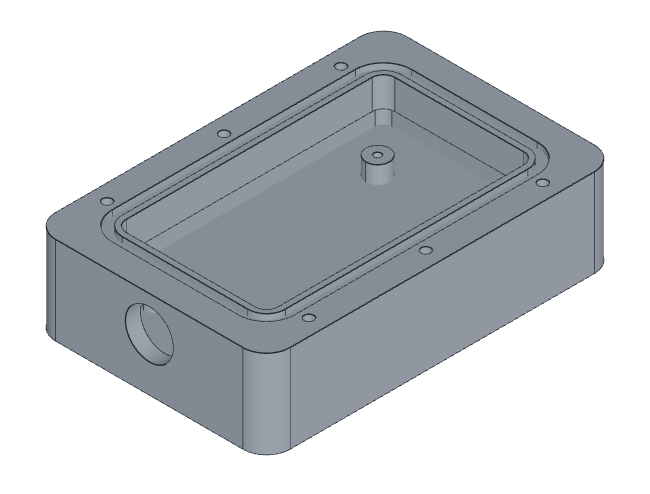
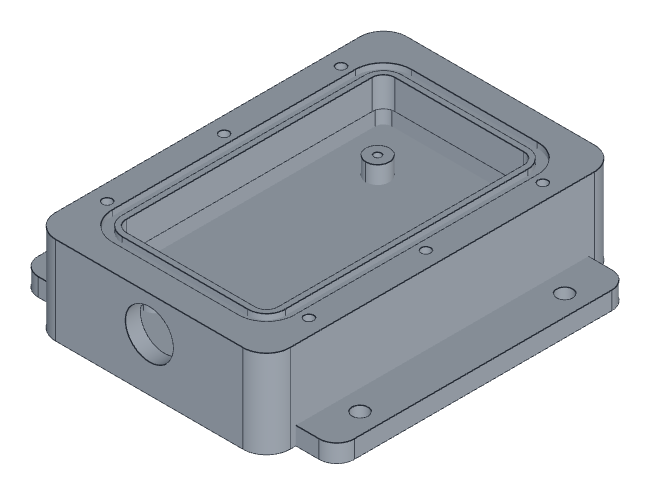
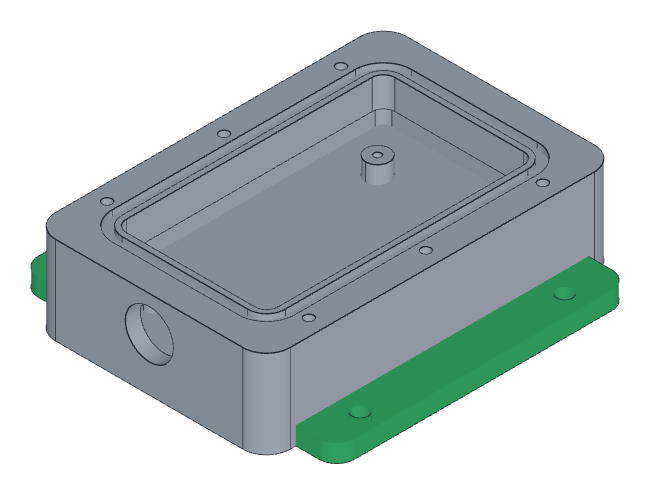
A sealed enclosure machined from a 6061 billet: a pocketed body 120 by 108 by 30 millimetres over its flanges, with a widened sealing land round the open top carrying an O-ring groove and six M4 tapped holes for the lid, four M3 standoffs standing on the pocket floor, a 16.50 millimetre cable gland bore through one end wall, and a mounting flange down each long side with two 5.50 millimetre clearance holes in each. The flanges are picked out in green as the material the last turn added.
drag to turn
± change added 16 044 mm³
what came back 120x80x30 → 120x108x30 mm · volume +12.5% · mass 389 g (+43.32 g) · CoM 1.07 mm
02 — the check
It tells you what it is unsure about.
The part above came back closed, watertight and correctly massed. It also came back with two questions attached — neither of them asked for, and both about whether the thing can actually be made.
“The 14 mm rim is an internal ledge, so the pocket is wider below the mouth — that’s an undercut for a straight 3-axis endmill. Fine if the rim is cut with an undercut/T-slot cutter, but if you want pure 3-axis, the alternative is 14 mm walls throughout instead of 5 mm.”
“The gland bore (top at z=26.25) leaves only 1.85 mm between it and the groove floor at z=28.1. Dropping the gland centre to ~16 mm would give 3.85 mm. Say the word and I’ll change either.”
Nothing in the prompt mentioned endmills, and nothing in the numbers would have caught either one. The solid is valid on both counts — one closed body, correctly massed, every feature where it was asked for. Neither problem is a modelling error. Both are manufacturing ones, and they are the kind that turn up at the quote rather than at the screen.
The first is a shape a straight cutter cannot reach. The second is a wall thin enough to be worth a decision rather than a default. Either is a sentence to fix, which is the point: you are being asked, not told.
Two millimetres of aluminium between a sealed groove and a cable bore. The model measured it, and asked.
03 — the drawing
Everything a shop needs to make it.
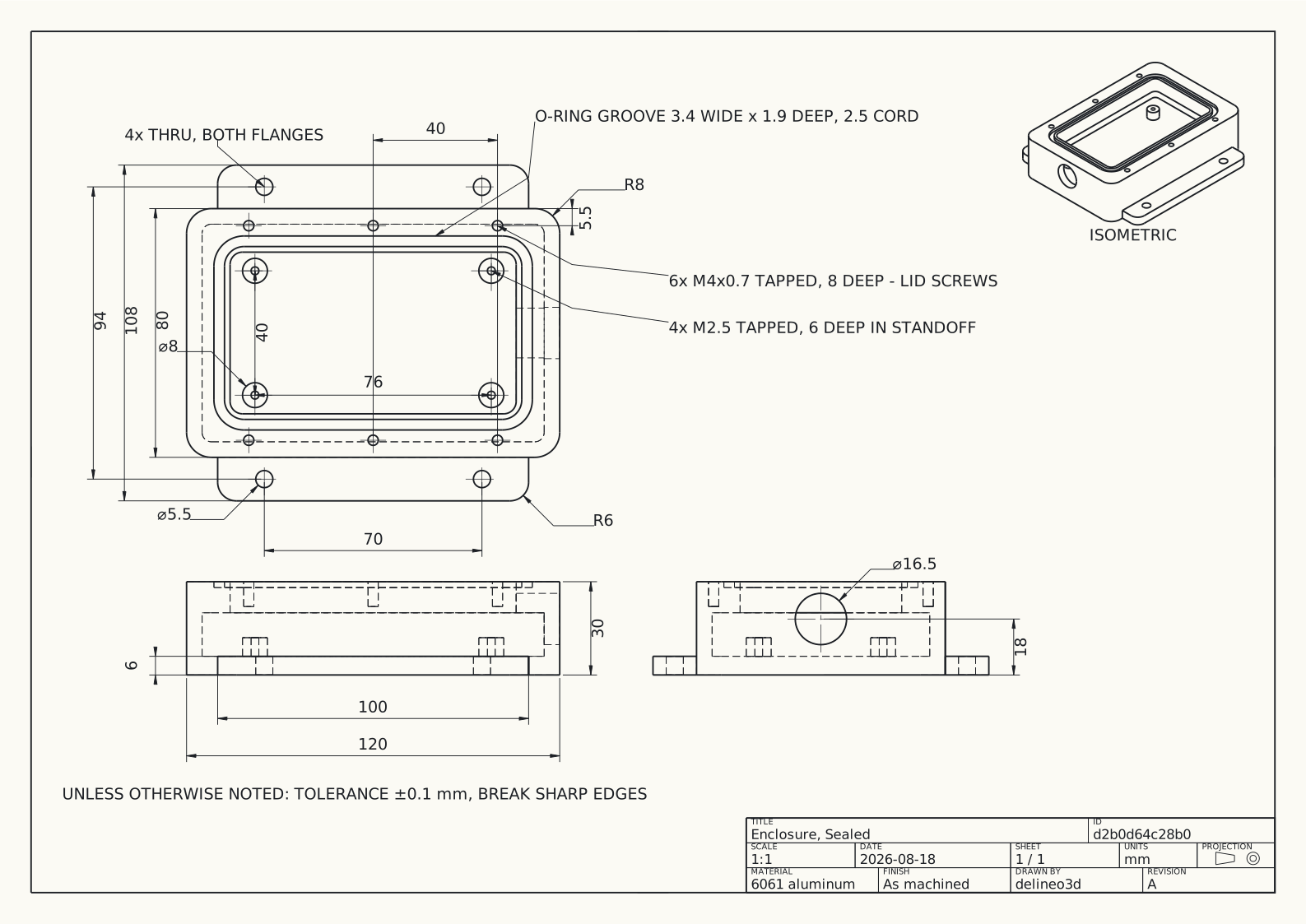
Conventional views, real tolerances, a filled title block. A century of drafting convention went into making a part legible on a sheet, and we did not try to improve on it. Here is the turn that drew this one — laid out, read back, revised twice — and then the sheet, to go and read for yourself.
Typed
Activity
Design step 1
List projects
Design step 2
Read part script
Read project
Design step 3
Stage drawing
Design step 4
Read drawing
Design step 5
Stage drawing
Design step 6
Stage drawing
Design step 7
Render drawing
Design step 8
Publishing final draft
Published final CAD changes
Read it
04 — export
Your model can leave.
STEP and STL for making it. PDF and DXF for quoting it. A model that cannot leave is not a deliverable, so this is not a tier and it is not a feature — it is the floor.
The solid, with its geometry intact, for the shop’s CAM or your slicer.
The sheet, as the thing you attach to an email asking what it costs.
AP214 · ADVANCED_BREP_SHAPE_REPRESENTATION · 7 232 lines · 292 kB Download this one
05 — pricing
Two plans. No surprise bills.
One person, one subscription, on day one. Prices in USD, tax-exclusive.
$20/ month
2,000 credits per cycle
One-off parts, fixtures and adapters, a few turns most days.
- Unlimited projects
- Drawings that regenerate with the part
- STEP, STL and 3MF; drawing PDF, SVG and DXF
- Cancel any time; access lasts through your paid cycle
$100/ month
10,000 credits per cycle
Working through real parts, many turns a day.
- Everything in Hobby — nothing is feature-gated
- 5× the monthly compute allowance
- Credit packs stack on top: $10 for 1,000, $25 for 2,500
- Priced for many turns a day, not for many seats
- creditsOne credit is about one cent of compute. Credits meter computation — a hard part costs more than an easy one, and we would rather say so than average it into a lie. Monthly credits expire with the cycle; packs last 12 months.
- no overagesWhen the balance hits zero, new work stops. It does not silently keep billing you.
- if you leaveA cancelled subscription keeps read, review, measure and export access to work you own.
06 — questions
The ones worth asking.
01 Is the output actually good enough to send out?
The sheet in section 03 is the honest answer: that is a real export, at full size, with nothing tidied up for this page. Third angle, 1:1, dimensioned and toleranced, title block filled, hidden detail dashed. Read it and decide.
What we hold to is a quality floor by default, and any standard you name in the prompt on top of it. If a machinist would wince at it, it is wrong — that is the test, not a checklist.
02 What happens when it gets something wrong?
You say so, and it takes another turn. That is the product — not a lucky first answer, but a loop that closes. The turn at the top of this page is one of those, start to finish, and you send it yourself.
It also checks its own work as it goes, and it will tell you what it is unsure about rather than letting you find out at the quote — section 02 is two such warnings, in the model’s own words. You can go back to any earlier revision at any point.
03 Can I get my model out?
Yes. STEP, STL and 3MF for the solid; PDF, SVG and DXF for the drawing. There is a real STEP export of this enclosure in section 04 — download it and open it in whatever you already use.
Export survives cancellation. A model that cannot leave is not a deliverable.
04 What does it cost, and what do I need to start?
Plans start at $20 a month. Create an account and choose a plan to start AI work; invited testers can use their complimentary allowance. You need a browser and a part you want. No install, no seat count, no administrator.
Your prompts, designs, and AI inputs and outputs are used to improve the product — model training included — and are shared with our model provider, who may also use them. There is no opt-out. The privacy policy is the full accounting.
the ask
Describe the part. The outline appears.
Create an account and choose a plan to start. Complimentary testing access is reserved for invited testers.
Create an accountComplimentary testing access is invitation-only. [email protected]